
You open a favorite character and see several conversations with almost the same beginning. Somewhere else, the images you wanted are mixed with the rest of your library. These are two organization problems. Picking the right place to tidy first is more useful than trying every menu until something moves.
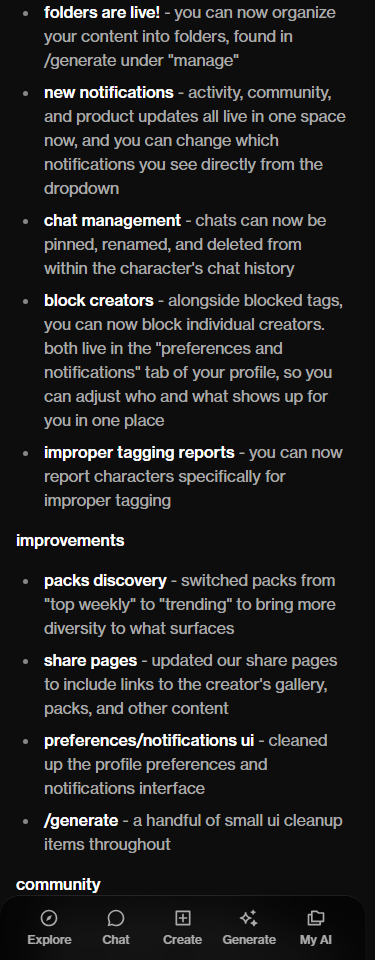
- Looking for a conversation? Start with that character’s history.
- Looking for generated media? Check the content-management area.
- Looking for better recall? Judge the conversation separately; a tidy list is not proof of memory.
Two places, two different jobs
OurDream’s September 18 product note documents content folders under Generate → Manage, while pinning, renaming and deleting chats belong to a character’s chat history. Checked October 11, 2026. This guide uses that public description; it does not claim a paid or signed-in usability test.
Source screenshot
Before opening a menu, finish this sentence: “I want to find _____ again.” Put the conversation name in the blank, or the image set, rather than the character’s name alone. A single character can be the subject of both. That shared name is precisely why the two tasks are easy to confuse.
Find your anime type.
Browse OurDream’s catalog. After choosing someone, check the history and media controls available in your account.
Give one conversation a useful name
An editorial naming example: “Observatory visit — October 11” tells you more than “New chat 2.” Put the distinguishing detail first, especially if your phone truncates a long label. A place, an unfinished question, or a scene title can work. Avoid names that reveal your real address, workplace or another person’s private information.
Make one small change first, then return to the history and check that you can identify the intended thread. Do not batch-rename several conversations before confirming you are in the right character’s history. If two threads still look identical, inspect their contents rather than assuming the newest-looking item is the one you wanted.
A pin helps you locate a thread; the scene itself belongs in the conversation. Keep a short note of the setting, the last agreed event and the unanswered question. When returning, use that note to recognize the right history entry before continuing.
Sort media by the reason you will revisit it
For your own folder names, use a purpose you can recognize later: “Outfit references,” “Apartment lighting,” or “October favorites.” These are suggested labels, not verified menu options. A small number of clear names is easier to maintain than a complicated taxonomy you stop using after a week.
Keep organization and credit costs as two separate decisions. The retained DreamCoins guide explains the credit budget; naming a folder does not answer which media actions use it. Start with a few existing items so you can choose labels that reflect how you actually revisit the collection.
Try a small editorial plan: use one folder for visual references and another for finished favorites. Decide where an item belongs by its purpose, rather than making a new folder for every variation. Revisit those labels after several sessions; merge categories you rarely use and keep the ones you recognize immediately.
Organization is not a recall test
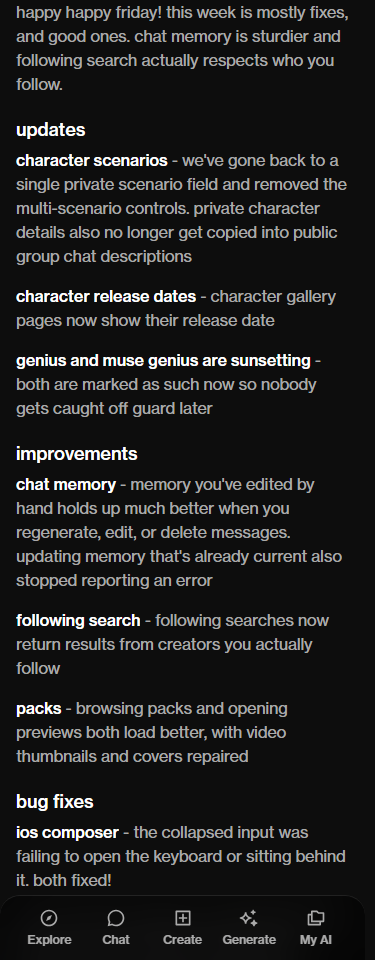
OurDream discusses memory separately in its October 2 product note, including a reported improvement to manually edited memory. That provider statement is not an independent reliability result. It also does not turn the earlier organization controls into evidence of better recall.
Source screenshot
A useful personal check is to pick one harmless fictional detail, continue a short scene, and see how the reply handles it. Record your question and the answer rather than relying on the impression that a cleaner sidebar feels more coherent. The retained chat, memory and photos explainer explains why these are different parts of the experience.
Check before deleting
If the only copy of an important passage is on screen, decide what you need to retain before choosing a destructive action. Do not assume a folder is an archive, a pin is an export, or a changed label proves which content will survive. Read the confirmation displayed by your own account and stop if its scope is unclear. The practical aim is simple: one recognizable conversation, one understandable media list, and no cleanup you cannot confidently explain.
Frequently asked
Are OurDream content folders the same as chat folders?
The September 18 announcement places content folders in Generate and chat management in a character’s history. It does not describe a shared folder for both.
Does pinning a chat make the character remember more?
That is not established by the organization announcement. Treat finding a conversation and evaluating what the character recalls as separate tasks.
What should I name two chats with the same character?
Use a distinct scene and date, such as Observatory visit — October 11. Put the distinguishing detail first so a shorter phone label still makes sense.
Does a pinned chat count as an exported backup?
No export or recovery guarantee is established by the documents reviewed for this guide. If a copy matters, verify a supported way to retain it before deleting anything.

Find a character worth coming back to.
Browse OurDream’s catalog. After choosing someone, check the history and media controls available in your account.
Meet JunoJuno your protector · 23 · OurDream