One character can be wrong for you without the entire catalog being wrong for you. Before adjusting preferences, identify the actual objection: the author, the theme, or a specific character. That small distinction keeps a broad block from becoming your first response to a narrow problem.
- Same author, several unwanted characters: consider the creator preference.
- Same unwanted theme across authors: inspect the relevant tag preference.
- A mislabeled or rule-breaking character: document the specific issue instead of treating a preference as a report.
What the public announcements establish
The September 18 release note introduces creator blocking alongside blocked tags in the profile’s Preferences and Notifications tab. Checked October 11, 2026. This guide compares public documentation; the exact controls and affected views should be checked in your own account.
Source screenshot
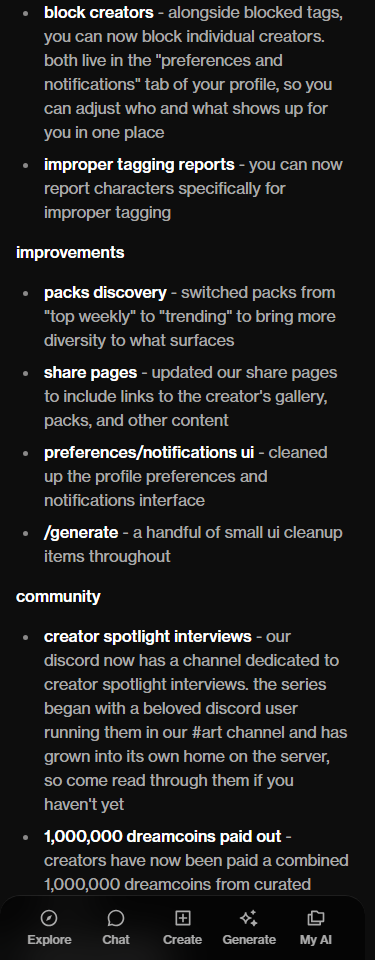
The names describe two different targets. A creator is a person publishing work; a tag is a label attached to a character or theme. Do not borrow another app’s block rules just because its menu uses similar words. A claim such as “their portfolio becomes unreachable” needs evidence from OurDream itself, not a screenshot from an unrelated service.
Find your anime type.
Explore the catalog with a clearer idea of the characters and themes you want to find.
Start with the smallest preference that fits
Imagine you like a creator’s visual style but do not want one theme they sometimes publish. The first question is whether the visible tag matches that concern. Conversely, if the concern is consistently that creator’s work rather than one label, changing a whole theme may exclude more of the catalog than you intended.
These are editorial decision examples, not observations of a particular creator. Keep your own check equally concrete: note the character, the displayed tag, the author and the preference you changed. Avoid a chain of five changes at once. If the next result differs, you will otherwise have no useful record of which change might have mattered.
Inspect the parent tag as well as the label
OurDream’s September 15 Explore update describes parent-tag groups and a revised blocked-tag interface. It asks creators to use the parent labels so filtering can work with the catalog’s tagging. That is a useful warning against treating every informal synonym as a separate, verified filter.
Source screenshot
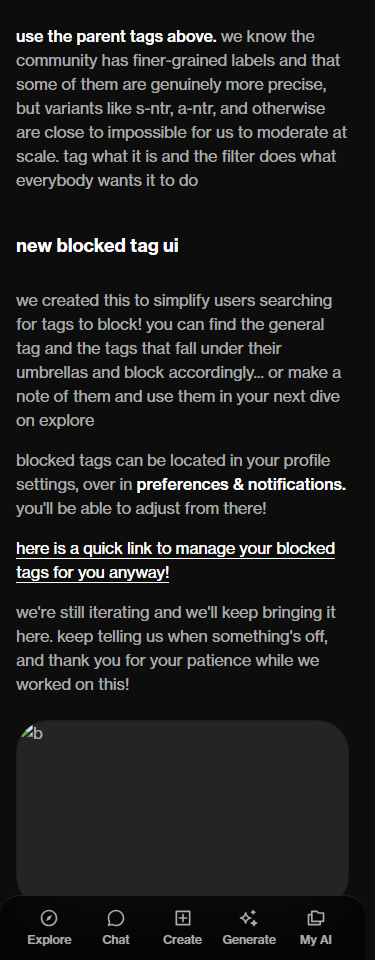
Write down the displayed label before translating it into your own shorthand. Compare it with the parent category described in the announcement, then look for that category in your preferences. If two terms appear similar, use the catalog’s visible wording in your notes so you can retrace the choice later.
An editorial comparison: keep two short lists, “more of this” and “less of this.” Put style, setting and conversation premise in the first list; put the unwanted theme or creator in the second. The positive list keeps your search focused on the characters you want to discover, instead of only on exclusions.
Blocking is not a moderation verdict
Disliking a character is different from alleging that it breaks the service’s rules. The official public-character accessibility help page gives privacy changes by the creator and policy violations as reasons a character may stop being publicly viewable. It does not say that your personal preference removes a character for everyone.
If you have a genuine policy concern, keep the character’s direct page and the relevant visible evidence. State the issue plainly. Do not use a creator block as a substitute for reporting, and do not frame a personal preference as proof that the creator did something wrong. Those are different requests with different purposes.
Evaluate discovery without inventing guarantees
A useful record is modest: what you saw, what preference you changed, and what you saw afterward. It cannot prove every recommendation surface, shared URL or logged-out view. If an unwanted character reappears, inspect its actual labels and source before deciding that a preference failed. Ask support a specific question if the visible result remains confusing.
Once you have found someone you want to revisit, the conversation organization guide explains where chats and media belong. How chat, memory and photos work separates the product’s different jobs. Clear expectations make a short catalog visit more useful than a long list of imagined guarantees.
Frequently asked
Where does OurDream document creator blocking?
The September 18 release note lists it alongside blocked tags in the profile’s Preferences and Notifications area.
Should I block a creator or a tag?
Choose a creator when the concern is that author’s work; choose a tag when it is a theme across authors. Start with the narrower preference that fits your reason.
Can a missing tag explain an unwanted result?
Treat that as something to investigate, not proof. Compare the visible labels with your preference and document the result before assuming the setting failed.
Does blocking a creator remove their character for everyone?
The reviewed announcement describes personal discovery preferences. It does not establish a public removal action or say that a blocked creator is notified.

Browse with a clearer idea of your type.
Explore the catalog with a clearer idea of the characters and themes you want to find.
Meet JunoJuno your protector · 23 · OurDream